How to find a YouTube channel's email address
You can find many creators' public business emails from their channel page. This guide shows you how to do it by hand and how to check a list of channels with Browsable.
The short answer
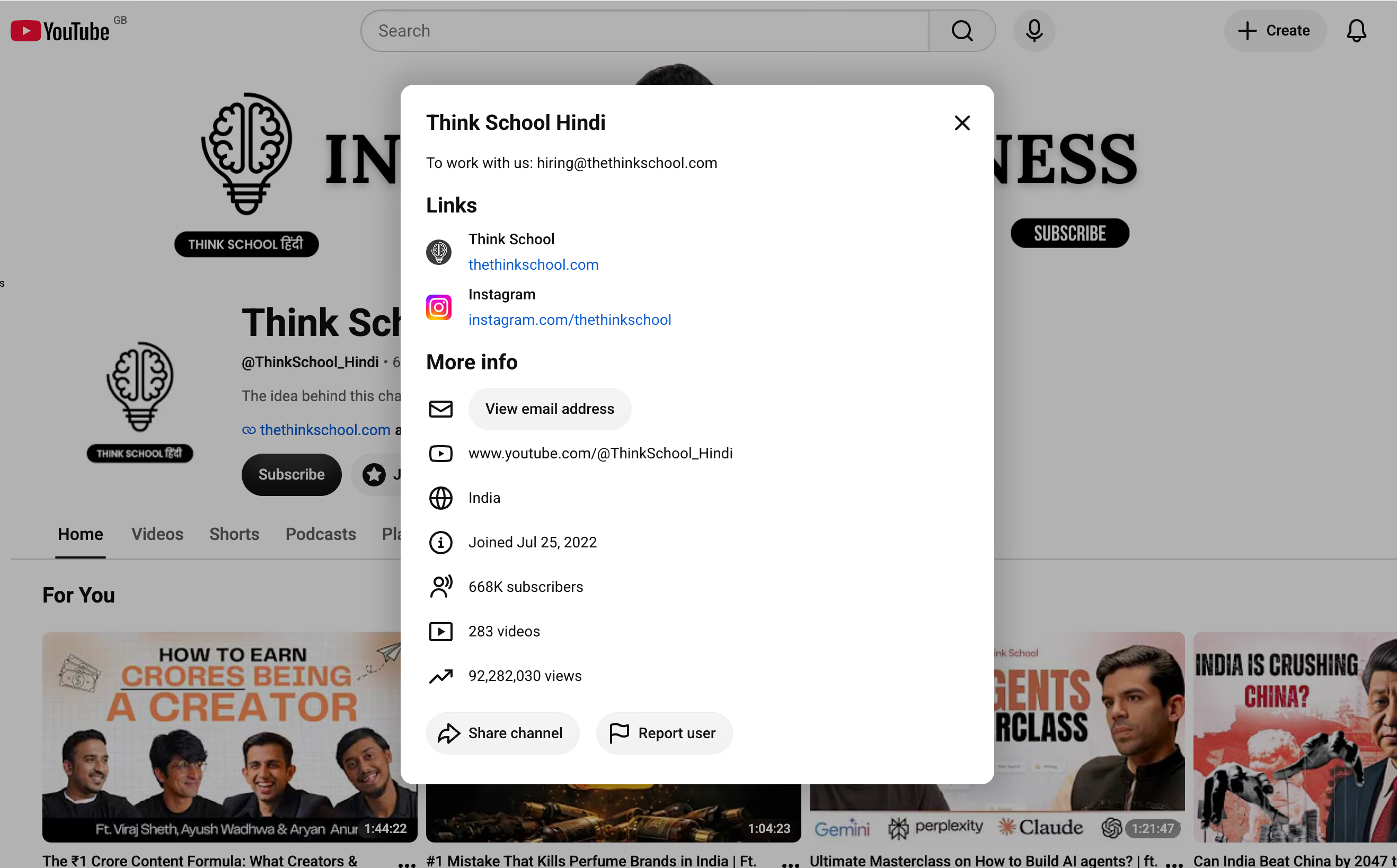
Open the channel, select its description, and look under More info. If the creator has added a business email, YouTube will ask you to sign in and may ask you to complete a quick check before showing it.
If you have many channel URLs, the Browsable YouTube email finder can scrape them in the background and give you a downloadable CSV.
Find a YouTube email manually
When you only have a few channels to check, you can find the emails manually. You need to be signed in to YouTube first to reveal the email.
- 1
Open the YouTube channel
Go to the creator's channel page. Make sure you are on the channel itself, not one of its videos.
- 2
Open the channel description
Select the description or the ...more link below the channel name. YouTube will open a panel with the full description, links and channel details.
- 3
Check the description and links first
Some creators write their email directly in the description. Others link to a website with a contact page. Check these first as it won't affect your quota.
- 4
Look under “More info”
If YouTube shows View email address or Sign in to see email address, select it. Complete the check YouTube shows, then copy the address.
Find emails from a list of YouTube channels
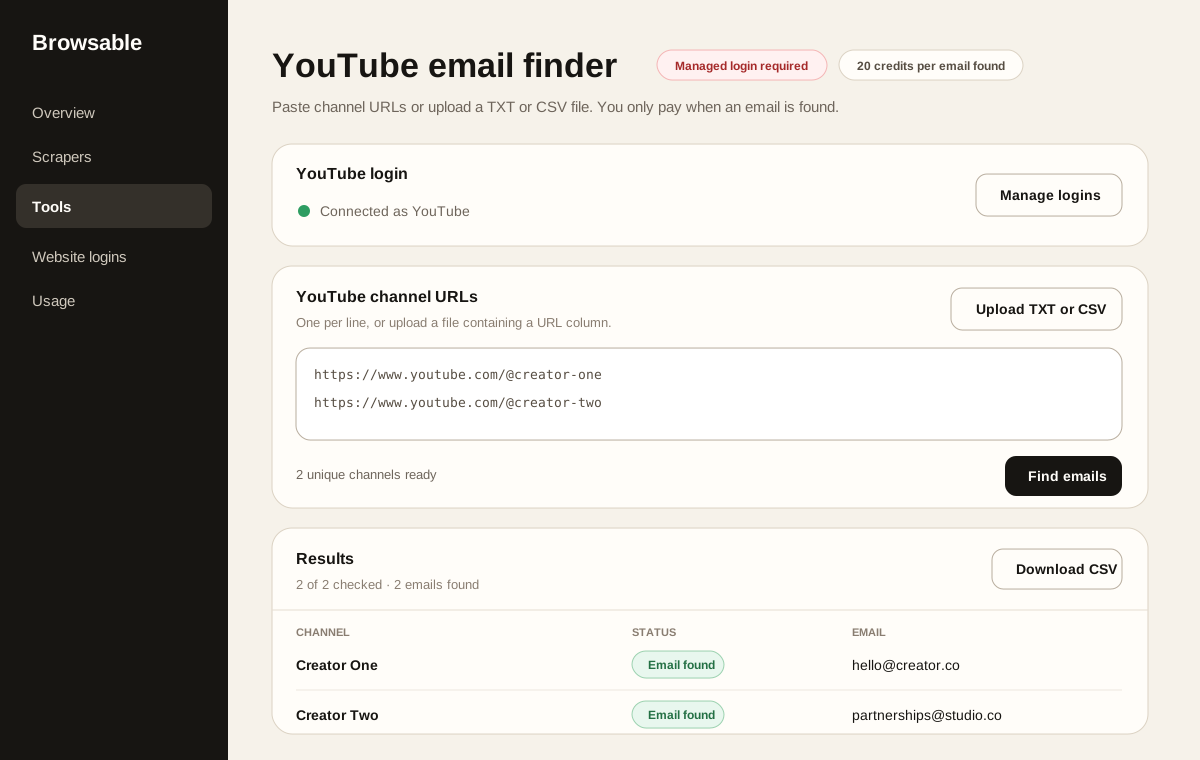
Repeating the manual steps becomes slow when you have dozens of channels. The YouTube email finder follows the same channel flow for each URL and keeps the results together.
- 1
Connect your YouTube login
Open the tool and connect the YouTube account you want to use. The tool needs a managed login because YouTube only reveals these emails to signed-in users.
- 2
Add your channel URLs
Paste one channel URL per line, or upload a .txt or .csv file. A CSV can contain other columns as long as it includes the channel URLs.
https://www.youtube.com/@channel-one https://www.youtube.com/@channel-two https://www.youtube.com/channel/UC... - 3
Start the check
Select Find emails. The tool checks the channels in order and tells you whether it found an email, no email was listed, or YouTube limited the request.
- 4
Download the results
When the batch finishes, select Download CSV. The file includes the channel, status, email and any useful message for each completed row.
20 credits for each email found
You are not charged when a channel has no available email.
Which method should you use?
| Choose this | When | What you get |
|---|---|---|
| Manual check | You have a handful of channels | An email you can copy immediately |
| Browsable tool | You already have a list of channel URLs | Statuses and emails in a downloadable CSV |
What to expect from YouTube's limits
YouTube controls how many protected business emails an account can reveal. The limit is not always predictable. You may see a limit message even if a later request works.
Browsable stops a batch when YouTube reports an account limit or asks for another check. This protects the connected account and avoids wasting requests. You can continue later or switch to another YouTube login that you own and are allowed to use.
Use the email responsibly
A public business email is an invitation for relevant business enquiries, not a licence to send generic spam. Explain why you are contacting that creator, keep the message short, and make it easy to opt out of future messages.
Follow the privacy, marketing and anti-spam rules that apply to you and the person you contact.
Frequently asked questions
Does every YouTube channel have a business email?
No. The channel owner must choose to add one. If the option is missing, check their description, website and social links.
Do I need to sign in to YouTube?
Yes, for emails protected by YouTube's reveal flow. An email written directly in a public description can be read without revealing it.
Can I upload a spreadsheet of channels?
The tool accepts TXT and CSV files. Export an Excel or Google Sheets list as CSV before uploading it.
What happens when YouTube limits the account?
The batch stops and keeps the results already collected. You can download those results and continue later.
Turn your channel list into a contact list
Paste your YouTube channel URLs, connect your login and download the results as a CSV.